A chat can answer your question. A dot can keep working after you leave—and may later ask to send something on your behalf. That shift, more than another model name, is the point of OpenAI’s September 29 Dots announcement. The company describes GPT-6 Astra-powered agents with their own cloud computers, persistent context, and access to connected apps. It says they can take on several ongoing tasks, report progress in ChatGPT, Slack, or Teams, and learn from feedback. These are product claims and examples, not independently measured completion rates.
The agent gets a workspace, not just a chat
A dot works in its own cloud computer, with a browser and tools; you can inspect that workspace. OpenAI says a user can opt to connect a personal computer too, but the cloud workspace is separate until that connection is made. Connected apps draw on permissions already granted through ChatGPT’s plugins. The announcement says the ecosystem reaches more than 4,000 apps; that counts possible integrations, not what every dot can access by default. The privacy FAQ says ChatGPT, ChatGPT Work, and Codex plugin permissions are shared with dots.
Disconnecting an app stops new sharing through that connection, OpenAI says, but does not erase information the dot has already taken into its context. Saved-password sign-in is designed to keep credentials out of the model’s context; that protection does not apply to a secret pasted into an ordinary readable message or document.
Noticing is not the same as acting
OpenAI calls its background discovery loop proactive research. According to its safety explanation, this loop reads permitted connected sources and writes private notes, but its research tools cannot directly send messages, change app content, or control a browser or computer. A follow-up action is a separate step governed by the usual permissions and checks. That is a meaningful distinction; it is not a promise that background findings can never lead to an action later.
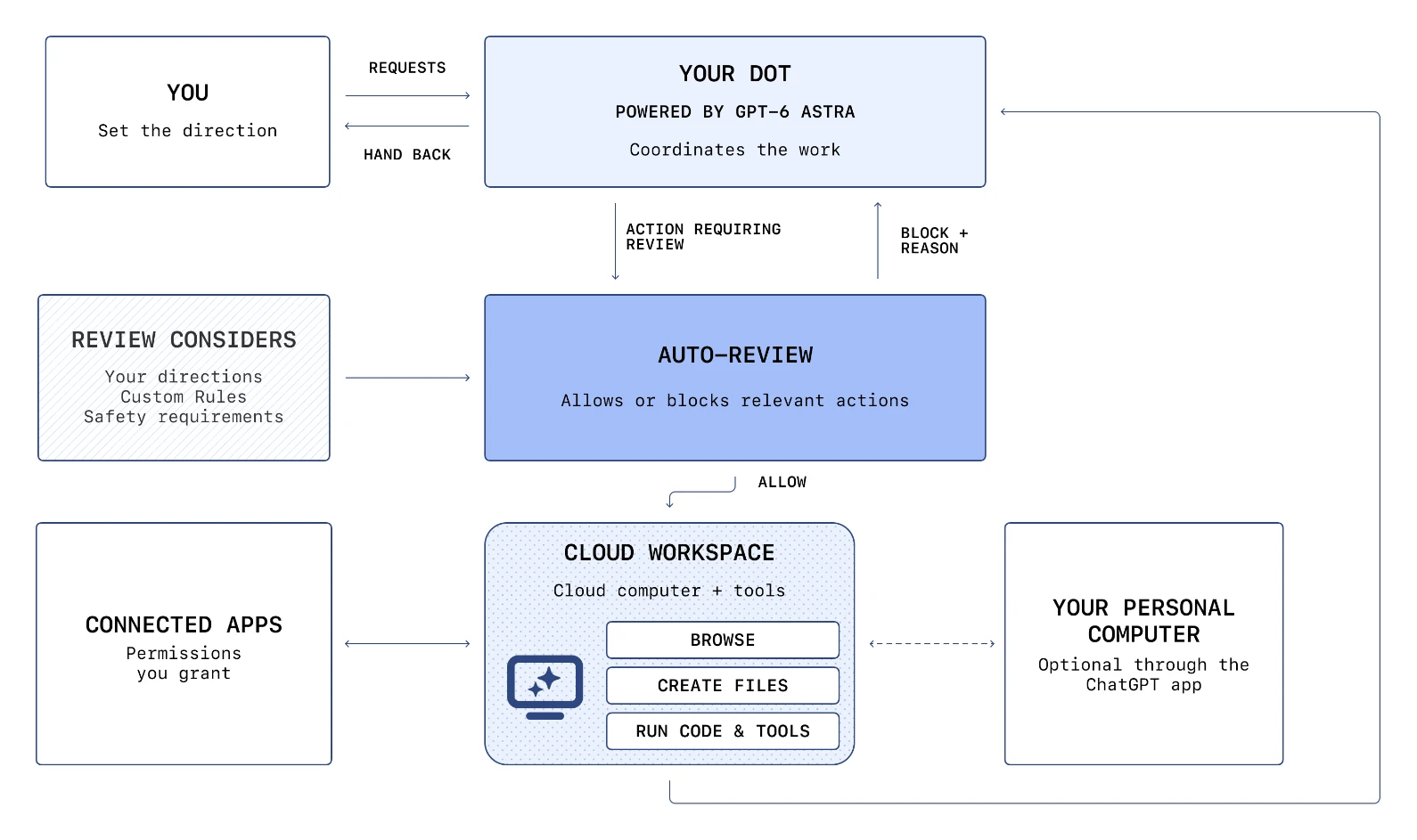
For steps such as sending email or changing files, OpenAI describes a separate Auto-review check against instructions, Custom Rules, and mandatory safety requirements. It allows or blocks the proposed step; if blocked, the dot may ask for approval or take another permitted route. Purchases require approval, while a password change or bank transfer is handed back to the person. Custom Rules cannot waive mandatory boundaries. OpenAI warns that dots can make mistakes: this describes a control design, not an externally established error rate or proof that prompt injection cannot get through.
Who can try it, and what is still a pilot
The launch described a gradual rollout to Pro and Business Premium users and an admin-enabled Enterprise beta. The getting-started FAQ, reviewed October 7, narrows that: Pro excludes the EEA, Switzerland, and the UK; Business Premium covers supported ChatGPT regions; Enterprise, including Edu and Healthcare, is initially disabled by default. Initial setup is on desktop web or the desktop app. The announcement mentions mobile messaging, but the FAQ says that arrives when mobile access is available and excludes mobile web; do not assume every account has it yet. The announcement called texting forthcoming, but the current FAQ describes a limited beta for eligible US Pro users—not Business or Enterprise workspaces. Adding more dots remains a future feature. Specialist dots with their own organizational identity are in focused enterprise pilots, and Microsoft Agent 365 integration is a stated goal, not a broadly shipped connector.
The first dot is included in Pro or Business Premium, with an allowance for deeper work and a larger initial limit. The reviewed materials do not give a representative task-level cost, latency distribution, or success rate. A project that crosses apps could consume usage through Codex or ChatGPT Work tasks even though conversations with a dot do not count toward ChatGPT conversation limits.
Before letting it loose
- Review the plugins your ChatGPT account already has; a dot can inherit those connections. Start with the smallest useful access set.
- Try a low-stakes task that reads one source, prepares an artifact, and proposes—but does not send—a consequential change. Record where approval is requested and what the Activity View actually shows.
- Test a malicious instruction inside a document or page, and verify the distinction between read-only research and a later requested action. Treat OpenAI’s safeguards as controls to evaluate, not guarantees.
- Measure the real task: accuracy, mistaken actions, human review time, limits, and any Codex or ChatGPT Work usage. A 24/7 agent is useful only if its work survives that accounting.