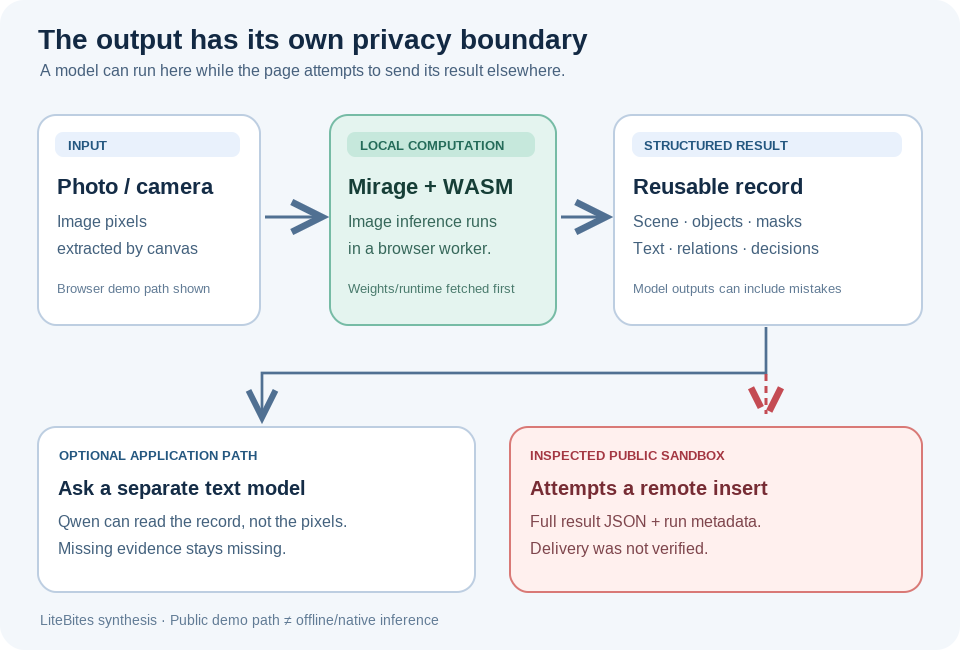
Point Mirage at a stop sign and it does more than say stop sign. In Cactus Compute’s November 6 release, the compact vision model returns a description, object boxes and masks, detected writing, and relationships that an app can inspect separately. The interesting part is the record: perceive an image once, then reuse its fields for an overlay, a bounded choice, or a question passed to another model. But the public browser demo has a privacy boundary that its “runs locally” label does not explain.
One image, several kinds of evidence
Mirage’s released 2-bit example identifies a stop sign and its pole, places boxes around them, and draws masks. Asked separately to choose among stop, yield and speed limit, it assigns 78% to stop. The same example exposes an OCR mistake: its rendering of the sign includes an incorrect accent in “ARRÉT.” A useful prediction is not a guarantee that every field is right.
The model has 51.3 million parameters, with a 21.6 MB quantized weights file; that file size does not include the engine or working memory. Its shared image encoder feeds detection and mask heads, a reader for cropped text regions, and a short decoder for the scene record. That division matters for developers: a box identifies where a finding came from, while an object ID lets a relation refer to the same finding. It is not merely a paragraph of image description. The Python API can request selected sections or fields, or constrain an extract call to choices supplied by the app. Cactus also publishes model files and native, Python and WebAssembly runtime builds.
When a text model reads the record
Cactus’s linked experiment fed Mirage’s observations to an unchanged Qwen3-0.6B, which never saw the photo. For “What drink is shown?”, Mirage named a wine bottle and glasses; Qwen answered wine and received full credit on that question. The observation also invented or misread other details, including garbled label text. In another photo, Mirage omitted a skateboard and Qwen answered car from the misleading record. The second model cannot recover visual evidence the first one failed to record.
On 256 VQAv2 questions from 128 images, the authors’ recorded VQA-consensus scores were 31.25/100 with Mirage’s record and full trace, 33.09 without the trace, and 22.23 with another image’s record. The trace did not show a reliable benefit. This is an exploratory two-model interface result, not Mirage-only accuracy or a comparison against a full vision-language model. Cactus released the protocol, recorded answers and runnable code; those records can be checked, but we have not rerun image inference. The reported Galaxy S26 latency and broad OCR or segmentation quality likewise need independent, task-specific tests.
Local computation is not a privacy policy
In the inspected browser worker, image RGB goes into a locally loaded WebAssembly model. We found no raw-photo upload in that first-party inference path. After a successful run, however, the sandbox page code attempts to insert the entire result JSON into a remote database, along with run metadata and a session ID. Recognized writing or descriptions can therefore leave the browser even when the original pixels do not. This is evidence of an attempted send in code, not confirmation that any particular request was received; the page also loads analytics.
For a non-sensitive photo, try the sandbox and inspect both correct and incorrect fields. For private images, use the native offline deployment path instead of assuming the demo is results-private; the Python wrapper’s separate usage telemetry can be disabled with CACTUS_TELEMETRY=0. Before building a camera overlay, label reader or visual Q&A tool around Mirage, test the exact task’s missed objects, OCR errors and output limits against checked examples. Compact, reusable perception is the proposition—not a promise that every record is complete.
Sources
- Cactus Compute — Mirage release, November 6, 2026
- Cactus Compute — structured perception, examples and VQA experiment
- Mirage + Qwen experiment archive and protocol
- Released Mirage model files
- Cactus runtime builds
- Browser inference worker
- Public sandbox page code containing the result insert
- Python API and offline deployment
- Python wrapper telemetry implementation