A desktop agent can find a button. The harder question comes a moment later: is it still the same button? Agent Desktop, an existing open-source project now under Vercel Labs, puts that question in the interface between an agent and the operating system. Its October 28, 2026 v1.0.0 release added Linux to its macOS/Windows CLI and C library; v1.0.2 followed on October 30, alongside the Vercel Labs repository presentation and new docs. This was not the project’s first release or proof that agents can reliably finish desktop tasks.
An element is more than a coordinate
The native Rust CLI reads an app through its OS accessibility API—AX on macOS, UI Automation on Windows, AT-SPI on Linux—and returns a JSON tree. A snapshot might label a Finder item as a treeitem and give it a qualified reference such as @s8f3k2p9:e8. The calling agent then uses click @s8f3k2p9:e8 and takes another observation. The project says the agent, not the CLI, owns this observe–act–verify loop; its C library offers the same interface to other programs.
The ref is not a durable selector. Before a ref action, Agent Desktop loads the saved snapshot’s identity evidence and tries to identify that element in the live process and window. If it cannot find a suitable match, it returns STALE_REF; if several plausible targets remain, AMBIGUOUS_TARGET. A changed interface can sometimes still yield a valid match, but the recommended response to change is a fresh observation—not an old screen coordinate or a guessed replacement.
When a failed click may have landed
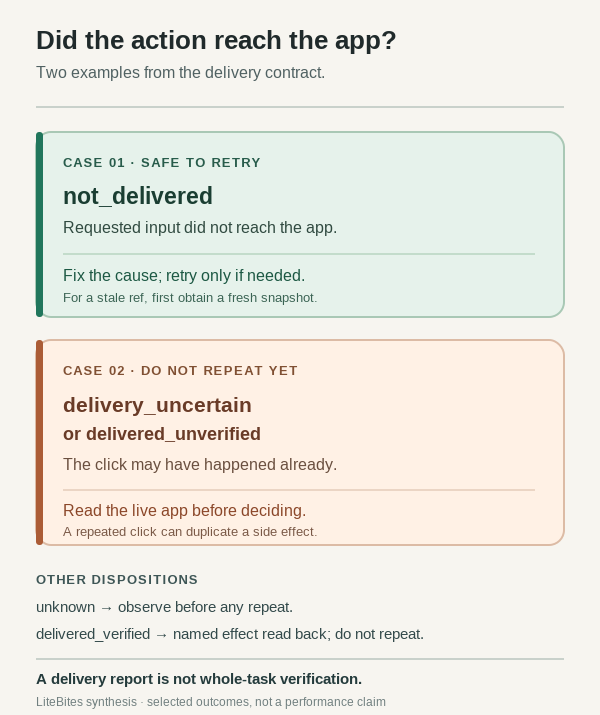
Finding the right target and knowing whether an action happened are separate problems. The project’s error contract distinguishes not_delivered (safe to retry after fixing the cause and following any supplied recovery plan) from delivery_uncertain and delivered_unverified (inspect the app before repeating). unknown also calls for inspection; delivered_verified confirms the named postcondition, not the whole task, and is unsafe to repeat. A second click might submit twice; a second toggle might undo the first. ok: true does not by itself establish that the app-level task was completed. The workflow guide prefers state-setting commands such as set-value or check when they fit, followed by an independent read.
What the accessibility boundary leaves open
Headless ref actions use accessibility APIs by default, without moving the pointer or taking focus; screenshots and physical-input mode are separate options, not an automatic visual-recognition fallback. Apps that expose poor accessibility data limit what the tree can tell the agent. Nor is support identical everywhere: macOS needs Accessibility permission, Windows is constrained by desktop integrity levels, and Linux’s X11/Wayland capabilities differ. A version number and a list of commands cannot settle those gaps.
The native CLI does not need a model service, but that is not the same as a private agent. The project’s FAQ warns that snapshots, window titles, clipboard reads, traces and screenshots can contain sensitive content. Its separate, optional JEV helper sends screen descriptions to a configured model provider. Desktop permissions also grant broad reach; the CLI is not a per-app security sandbox. Code and cross-platform tests describe a careful interface, but they do not independently measure end-to-end agent success.
Try the refusal path first
Start in an unimportant app. Take a snapshot, change the UI, and see whether a stale or ambiguous target is refused; then test a harmless state-setting action and verify its effect with a new read. Before using sensitive apps, check the platform’s actual capabilities, grant only necessary OS permissions, and decide where snapshots, traces, screenshots and any agent-model prompts may go. The value here is a more explicit contract for acting and stopping—not a guarantee that every desktop task can be automated safely.
Sources
- Vercel Labs — Agent Desktop repository, CLI, platform notes and source code
- Agent Desktop v1.0.0 release — cross-platform milestone
- Agent Desktop v1.0.2 release — October 30 update
- Agent Desktop — snapshots and strict ref resolution, pinned source
- Agent Desktop — delivery dispositions and recovery, pinned source
- Agent Desktop — observe, act, verify guide, pinned source
- Agent Desktop — privacy FAQ, pinned source