A computer-use agent needs a desktop to click around. Does that desktop have to be yours? terminal-mac’s November 3, 2026 release offers another arrangement: an Apple-silicon Mac runs a separate macOS virtual machine, whose screen appears in a terminal and whose controls are exposed to agents. The name describes the view, not the host requirement. This does not run macOS on Linux or Windows, and the project calls itself an early release candidate.
The agent clicks inside the guest
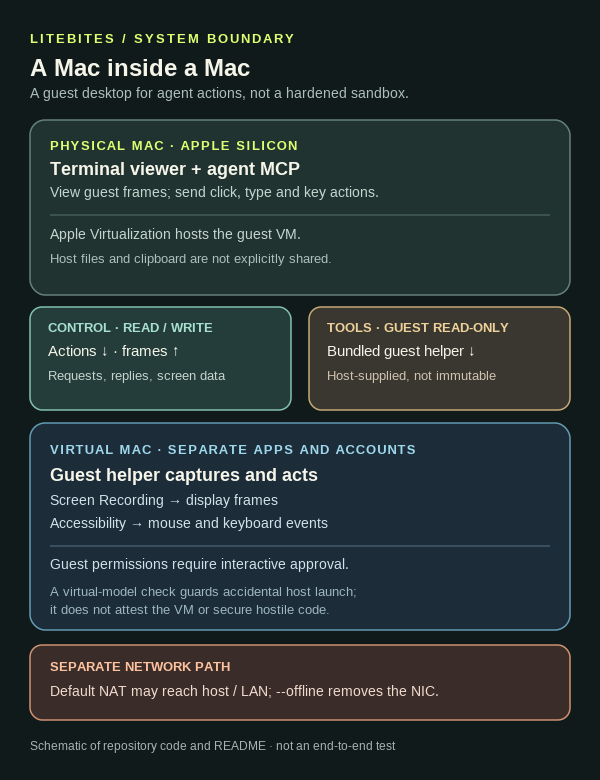
The host configures Apple’s Virtualization framework with a Mac guest, a display, a disk, and normally a network adapter. A helper running inside that guest captures the display and posts mouse and keyboard events there. It needs Screen Recording and Accessibility approval in the guest, not on the physical Mac. A shared control folder carries requests, replies and screen data; a read-only-from-guest tools folder supplies the helper. The terminal viewer renders frames, while the MCP server exposes screenshots and input actions to an agent. snapshot is a screenshot alias, not an accessibility-tree snapshot.
That split is the interesting part. The agent can work in a guest with its own apps, files and sign-ins rather than acting directly on the host’s active desktop. The guest helper’s virtual-machine check guards against accidentally running it on the physical Mac; it is not hardware attestation. Nor has the project yet demonstrated, in its published acceptance record, that host focus, pointer and clipboard remain untouched during live guest input.
Separate desktop, porous network
The VM keeps normal host folders, microphone, camera and clipboard out of its explicit shares. But the README’s isolation model is careful: default NAT networking may still reach services on the host or local network. --offline removes the guest’s network adapter; it does not remove the two shared folders. This separates desktop interactions; it is not a hardened environment for hostile code. A user still needs to set up macOS inside the guest and grant the helper its permissions interactively.
Distribution deserves the same restraint. The latest release contains an Apple-silicon ZIP and a checksum-checking installer, but public builds are self-signed and not notarized. A checksum delivered by the same download path checks transfer integrity; it does not independently authenticate the publisher. Read the installer and release assets before running the documented curl | bash command.
What a clean-Mac run still has to prove
The project’s validation record reports successful build, packaging and protocol tests. It also explicitly leaves the full guest installation, privacy grants, screenshot alignment, input, and terminal viewing on its uncompleted live acceptance checklist. An open first-launch issue reports a guest-helper relaunch loop on macOS 27.2; its suggested cause is a commenter’s unconfirmed theory, not a diagnosed defect across all versions.
For an agent workflow, the next useful evidence is a clean-Mac run: install and sign into the guest, grant its permissions, check that screen and input actually work, then observe whether the physical desktop stays undisturbed. Until then, terminal-mac is a concrete, unusually candid design for a separate agent desktop—not proof of reliable end-to-end automation or a hardened security boundary.
Sources
- govijr — terminal-mac v0.2.0-6 release, November 3, 2026
- terminal-mac README — requirements, workflow and isolation model, pinned source
- VM configuration — boot, shares and networking, pinned source
- Guest helper — capture and input path, pinned source
- Agent MCP tools, pinned source
- Maintainer validation record and live acceptance checklist, pinned source
- Distribution and signing guide, pinned source
- First-launch issue report